 Home
Thoughts of Mine
Vithanco Moved Into the Browser
Home
Thoughts of Mine
Vithanco Moved Into the BrowserVithanco Moved Into the Browser
Estimated reading time: 5 minutes.
For most of its life Vithanco has been a Mac app, and it still is. Its founding idea has not changed either: you say what the things are and how they relate, and the diagram arranges itself. Fiddling with layout was never meant to be part of the thinking, and that is the one thing Vithanco has always refused to make you do.
What is new is where it runs, and what a diagram is made of. There is now a second Vithanco living in a browser tab — no Mac, nothing to install — and there the document is text.
An example, in two steps
Say I am wondering why I am always tired. The first thing I notice is simple enough: being tired makes me reach for coffee, and coffee is not doing my sleep any favours. Three things, two links.
vgraph tired: CLD "Why am I always tired?" {
    node tired: Stock "Tiredness"
    node coffee: Stock "Coffee"
    node sleep: Stock "Good Sleep"

    edge tired -> coffee: same
    edge coffee -> sleep: opposite
}
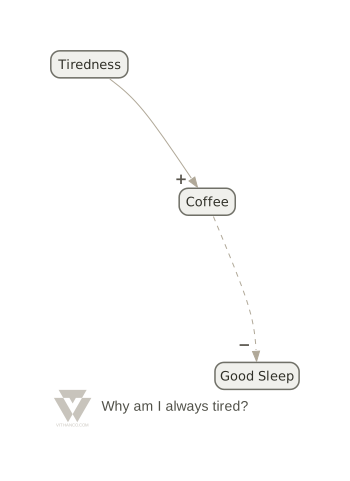
More tiredness, more coffee. More coffee, less sleep.
That is the whole document. I did not decide where "Coffee" sits, or which way the arrows curve, or that the weakening link should be dashed and carry a minus. I said this was a causal loop diagram and named three things. The rest followed.
Then the thought I had been avoiding turns up: bad sleep is precisely what makes me tired in the first place. That is one more line.
edge sleep -> tired: opposite
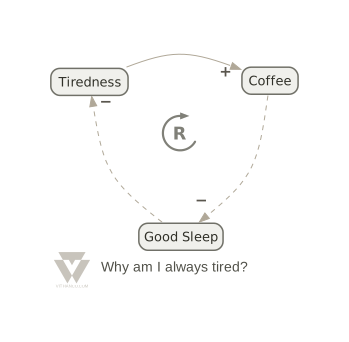
The same three things, one line later.
Two things changed there, and only one of them is layout. The diagram folded itself into a ring, which is tidy but not especially interesting. The interesting part is the R in the middle, because I never typed it. Closing the circle made this a loop, and the notation then worked out which kind: two weakening links cancel each other, so the loop as a whole reinforces. It is a vicious circle, and the diagram says so without being asked.
That is what a notation buys you over a general-purpose drawing tool. Visio would have let me draw the same three arrows and told me nothing at all.
The language is called VGL. It is deliberately small — nodes, edges, groups, and attributes on any of them. If you have written a Graphviz file you will find it familiar; if you have not, the eight lines above are most of it.
The notation pushes back
This is the part I am most pleased with, and it is hard to show in a screenshot.
Each notation knows its own rules. A concept map wants a relation between two concepts, not a concept wired straight to another concept. IBIS says an answer may object to a con. A C4 model knows what may sit inside a boundary. So when you try to connect two things the notation does not allow, the editor declines — not with a modal you dismiss, but by simply not offering the connection.
And when it does let you through, it tells you what it thinks. There is a diagnostics panel under the diagram: errors where the document is wrong, warnings where it is thin ("only 2 concepts — consider adding more to fully explore the guiding question"), and plain counts. A diagram is an argument, and an argument can be weak without being invalid.
You can always insist. Hold ⌥ and the refused edge is made anyway — drawn in bold red, so nobody, including you in three months, mistakes it for something the notation sanctioned.
Writing is not the only way in
Text is the foundation, but it is not the whole interface any more. Over the year the diagram itself became something you can work on directly: drag one node onto another to connect them, with the line green where the drop is legal and red where it is not. Drag an edge end to move it somewhere else. Double-click a label to rename it. Rubber-band a few nodes and put them in a group. Right-click anything for the operations that apply to it — change this node's type, flip that edge, split it in two and put a node in between.
All of it goes through the same undo stack as typing, and all of it is checked against the notation the same way. Whichever way you work, the text stays the document.
There is one more thing I like more than I expected to. Save a diagram as SVG and it carries its own source inside it. It is a perfectly ordinary picture — drop it in a document, mail it to someone — but open it back up in the editor and the diagram is there, editable. A picture that is also a file.
What is under it
The interesting part, if you care about such things: the whole engine is Swift compiled to WebAssembly, with the Graphviz layout engine compiled in alongside it. One module, about four megabytes, and no server.
That last bit matters more than the size. Nothing you type is uploaded, because there is nothing to upload it to — no account, no session, no diagram of yours sitting in a database I would then be responsible for. The page loads, and after that it is your browser doing the work. It keeps working on a train.
Notations
There are rather a lot now. The Theory of Constraints thinking processes are all there — current reality tree, future reality tree, prerequisite tree, transition tree, goal tree, evaporating cloud. So are concept maps, IBIS, mind maps, decision trees, causal loop diagrams, impact maps, benefit breakdown structures, attack-defense trees, timelines and the C4 model.
And if none of them fit, you can declare your own inside the file — node types, edge types, what may connect to what. That started as a feature for me and has turned out to be the one I reach for most. There is a notation in there for a children's arithmetic game, which tells you how far it stretches.
Where to look
The editor is at vithanco.com/editor. Every example on the site opens straight into it, so you can take a working diagram and start changing it rather than facing an empty page.
If you have old documents from the Mac app, there is a small converter — vithanco2vgl — that turns them into VGL so they keep working.
I would genuinely like to know what you make of it, and particularly where it gets in your way. That is the useful feedback.